Hex, binary and octal calculator.
Convert between number bases, mix them in one expression, and run logic operations, all in Base mode.
Included in Scientific Calculator RealMax · Scientific Calculator Pro
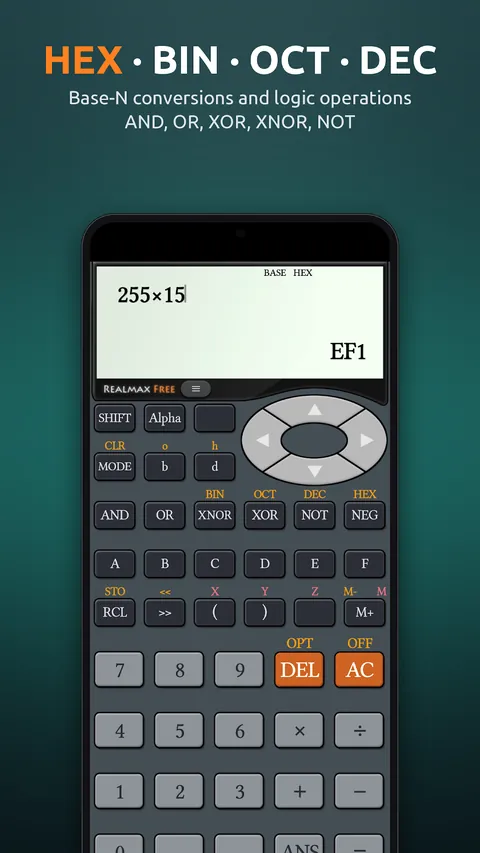
Base mode works in binary, octal, decimal and hexadecimal. Switch base with SHIFT + BIN, OCT, DEC or HEX, and RealMax shows the answer in the current base.
Mix bases in one expression with prefixes: b for binary, o for octal, d for decimal and h for hex. Logic operations include AND, OR, XOR, XNOR, NOT and NEG, plus left and right shifts. Values use two’s complement, so negative numbers work the way programmers expect.
Examples
How to use it in RealMax.
- 1Press MODE and choose Base.
- 2Choose the answer base with SHIFT + BIN, OCT, DEC or HEX.
- 3Type values, using b, o, d or h prefixes to mix bases.
- 4Press = to get the result in the current base.
Want more detail? Read the Base mode guide →
Good to know.
What range of numbers does Base mode support?
Binary mode accepts −32768 to 32767. Octal, decimal and hex modes accept −2147483648 to 2147483647, using two’s complement.
Which logic operations are available?
AND, OR, XOR, XNOR, NOT and NEG, plus left (<<) and right (>>) bit shifts.
Try the hex & binary calculator free
Download Scientific Calculator RealMax from Google Play. iPhone and iPad versions are coming soon.