Derivative calculator for Android.
Type a function, press d/dx, and get the exact derivative formula, or its value at any point. No internet needed.
Included in Scientific Calculator RealMax · Scientific Calculator Pro
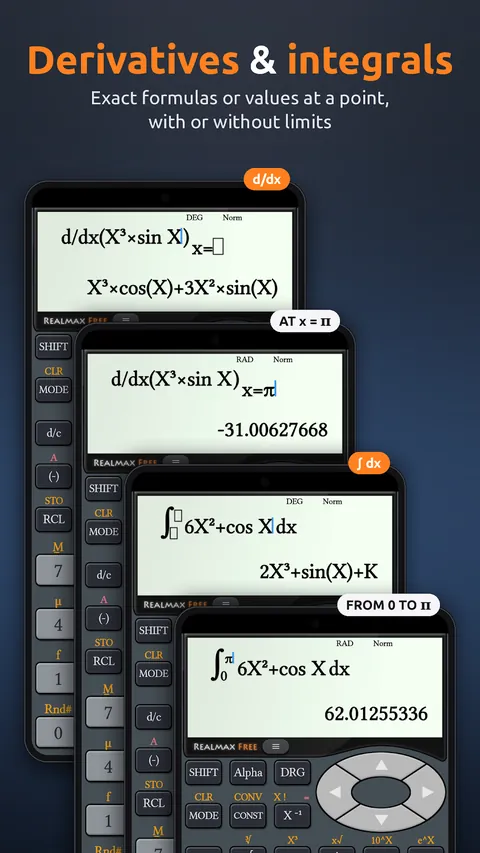
Most phone calculators can only give you a number. RealMax works out the derivative itself, so you see the formula the way you would write it on paper: d/dx(X³) = 3X², or d/dx(X³ × sin X) = X³ × cos(X) + 3X² × sin(X).
Need the slope at a specific point instead? Enter a value for x and RealMax evaluates the derivative there. Combine powers, trigonometric functions and more, and check your calculus homework step by step.
Examples
How to use it in RealMax.
- 1Open RealMax in Scientific mode.
- 2Press d/dx and type your function using X, for example X³ × sin X.
- 3Press = to see the derivative formula.
- 4To get the slope at a point, enter a value for x before you press =.
Want more detail? Read the Scientific mode guide →
Good to know.
Does RealMax show the derivative formula or just a number?
Both. It shows the exact derivative formula, and it can also give the value of the derivative at any x you choose.
Is the derivative calculator free?
Yes. Derivatives are included in the free Scientific Calculator RealMax. Scientific Calculator Pro has the same features without ads.
Does it work offline?
Yes. Calculations run on your phone, so you can work without an internet connection.

Try the derivative calculator free
Download Scientific Calculator RealMax from Google Play. iPhone and iPad versions are coming soon.